Filmic Pro: Mobile Cine Camera
- 2.3
- Rating
- 1.00M
- Installs
- Free
- Price

 Analysis by App-foxy
I tested Filmic Pro: Mobile Cine Camera as a serious photography and video tool rather than a casual camera replacement. My first impression was that it asks more from the person holding the phone, but it also gives that person much more control than the standard camera app. It comes from Bending Spoons and is free to install, with optional purchases ranging from under a dollar to considerably more depending on the item. The app is rated for Everyone, so it can sit on a shared household device from an age-rating perspective, although its controls are aimed at people who are comfortable making deliberate filming decisions.
The app’s store summary presents it as a professional choice associated with Oscar-winning directors, but I found its real appeal in smaller, practical situations: recording an interview, preparing a short film, filming a school presentation, or getting more consistent footage during a family event. It is not simply a filter collection or a point-and-shoot camera. The useful question is whether you want to direct the phone’s camera yourself. If you do, Filmic Pro can feel rewarding. If you want the phone to make every decision automatically, the regular camera app is usually less stressful.
How Filmic Pro works on a shared household phone
A realistic shared-device example is a family using one newer phone to record a child’s recital, a birthday message, or a small home project. One person may want a quick clip, while another may want controlled exposure, a stable focus point, and a more deliberate look. Filmic Pro is better suited to the second person. Before recording, I would hand the phone to the person who understands the shot rather than assume that every household member will enjoy learning the interface on the spot.
You May Also Like

 Blood Strike: 2.5 Anniversary
Blood Strike’s Loadouts Turn Every Drop Into a Tactical Gamble
A close look at Blood Strike’s custom loadouts: how fast access to signature weapons reshapes its battle royale rhythm, rewards preparation, and narrows the gap between fights.

 Pandora - Music & Podcasts
Pandora’s Music Is Easy to Start, but Harder to Recover
Pandora’s strength is its low-effort path from a seed to a station. Its weak spot is how much confidence it asks you to place in connection, setup, and quiet recovery.

 8 Ball Pool
 Is Built on Rivalries, Rematches, and Routine
A close look at the rivalries, rematches, shared routines, and unanswered safety questions that turn a quick pool match into a persistent mobile community.

 Samsung Music
’s Quiet Strength Is Playing What You Already Own
Its reach comes less from spectacle than from dependable access to a personal library. That simplicity is both the app’s strongest retention engine and its ceiling.

 AccuWeather: Weather Radar
AccuWeather Review: A Quick, Clear Forecast for Everyday Decisions
For everyday plans, the best forecast is the one you can understand quickly. AccuWeather makes rain timing, radar, and local conditions easy to act on, with a few trade-offs.

 Hill Climb Racing
Why Hill Climb Racing Still Turns Crashes Into One More Run
A tiny car, a bumpy hill and one more upgrade: Hill Climb Racing keeps resurfacing because its simple chaos makes every near-miss feel personal.
More From Our News Desk



That distinction matters because the app places more decisions in front of you than a normal mobile camera. A casual user can open it and start recording, but the benefit appears when you pause to manage focus, brightness, and framing. On a shared phone, that creates a simple coordination issue: one person should act as the camera operator, while someone else can direct the subject or monitor the scene. Passing the phone around during an important moment is more likely to cause mistakes than with the built-in camera.
I also found that Filmic Pro makes a household think about consistency. If several people record the same event with the ordinary camera, each person may tap a different subject, change the exposure accidentally, or hold the phone in a different orientation. With this app, agreeing on a basic setup before filming can produce a more coherent result. That is especially helpful when clips will later be joined together, because mismatched brightness and focus can be more distracting than imperfect composition.
For a quick family snapshot, I would not choose it first. The standard camera is faster, more familiar, and usually better at handling a moment that lasts only a few seconds. Filmic Pro earns its place when the recording has a purpose beyond simply keeping a memory: a planned message, a performance, a product demonstration, or footage that someone intends to edit carefully afterward.
What to settle before anyone presses record
On a shared device, setup boundaries are more important than they might seem. I would decide who is responsible for changing camera settings and who is only responsible for starting or stopping the recording. This avoids the common problem where one person adjusts an option while another is trying to maintain a shot. It also makes the app less intimidating for a relative who only needs to capture a prepared scene.
Film orientation should be agreed on before filming begins. Mixing vertical and horizontal clips in one household project can create unnecessary editing work, and people often notice the mistake only after the event is over. I would also choose the camera position, check the background, and make a short test clip. That test is valuable because it reveals whether the subject is framed properly and whether the person operating the phone understands the controls.
Another useful boundary is storage awareness. Video can quickly become inconvenient to manage, particularly when several family members record multiple attempts. I would keep only the takes that are genuinely useful and transfer finished clips away from the shared phone when the project is complete. Filmic Pro is a capture tool, not a substitute for a household’s broader system for naming, sorting, and backing up memories.
The app is free to download, but optional in-app purchases are part of the experience. I would not assume that every person using a shared phone should buy anything immediately. First, establish whether the basic workflow fits the household. If someone is only filming a single event, the ordinary camera may be enough. If a regular user is committed to controlled mobile production, then it makes more sense to examine the available purchase options directly and decide whether the added value matches that person’s needs.
Coordinating a small production without making it complicated
Filmic Pro becomes more approachable when the household treats filming as a small production instead of a mysterious technical exercise. One person can frame the shot, another can keep the subject ready, and a third can watch for interruptions or background movement. This division is useful for interviews, where the operator can concentrate on the phone while the interviewer maintains eye contact with the guest.
For an everyday interview, I would place the phone at a comfortable distance, frame the speaker with enough space around them, and make a short recording before asking the real questions. During that test, I would check whether the subject remains the intended focus and whether the room sounds acceptable. The important insight is that manual control cannot rescue poor preparation. A carefully adjusted camera still produces an awkward video if the speaker is too close to a bright window or if the phone is constantly being repositioned.
Another practical workflow is to create a repeatable starting routine. Open the app, confirm orientation, check the lens, set the framing, record a few seconds, review the result, and only then begin the main take. This may sound slower than using the default camera, but it saves time when the final video matters. In a shared household, the routine also gives less experienced users a clear sequence to follow rather than asking them to remember every control at once.
I would avoid changing several settings during one take unless the scene truly requires it. Each adjustment introduces another chance to lose the subject or create a visible change in the footage. For a family project, stable and understandable results are usually more valuable than using every advanced option available. The app rewards restraint: choose the controls that solve the actual problem and leave the rest alone.
For moving subjects, a second person can help by predicting where the action will go. The operator can then concentrate on keeping the subject framed instead of reacting late to every movement. This is one of the less obvious benefits of using a more deliberate camera app: it encourages the household to communicate before recording. The technology is only part of the improvement; the planning around it often makes the bigger difference.
Age, trust, and who should operate the app
Because the content rating is Everyone, Filmic Pro is not presented as an adults-only product. Still, an age rating does not mean every child will find the app easy or that every child should be left to manage a shared phone without guidance. The interface is more suitable for a young person who already understands framing and patience than for someone who wants instant results. I would begin with supervised use and a simple assignment, such as recording a stationary subject from a prepared position.
The trust question is less about the camera itself and more about the material being recorded. A shared device may contain family conversations, school activities, or private moments. Before filming another person, I would ask permission and explain where the clip will be kept and who may see it. This is particularly important when children are involved. A technically successful recording can still be a poor household decision if the people in it did not agree to be filmed.
I would also create a clear rule about deleting unwanted takes. A child learning the app may record many experiments, and another family member may not want those clips remaining on the device. Reviewing and removing failed attempts together teaches good digital habits without turning the app into a source of conflict. It also keeps the shared phone easier to manage.
Account boundaries deserve attention whenever optional purchases are involved. The person using the app should know whether they are simply using an existing installation or making a purchase connected to the device’s store account. I would keep buying decisions with the account owner and discuss them before tapping any purchase control. That is a sensible boundary for any shared phone, especially when different family members have different expectations about spending.
The app’s minimum operating-system requirement is iOS 9, which makes its stated compatibility broad enough to include older Apple devices. Even so, compatibility is not the same as a pleasant filming experience. Older hardware may feel less comfortable for demanding recording tasks, and the person choosing the device should test the actual workflow before planning an important event around it. The current version is 7.6.4, so I would also keep the installation updated where practical and check the interface before handing the phone to someone unfamiliar with it.
Where it beats the usual camera, and where it does not
The ordinary phone camera wins on speed. It is usually the better choice for spontaneous family moments, quick evidence of a repair, or a child suddenly doing something funny. Its familiar controls reduce the chance that someone misses the moment while searching for a setting. Filmic Pro wins when the shot is planned and the operator wants repeatable control rather than automatic convenience.
Compared with a simple video app built around filters or social sharing, Filmic Pro feels more like a camera workspace. That makes it a stronger fit for someone who wants to learn the reasoning behind a shot. It is less attractive for a user whose main goal is to add an effect and publish immediately. The trade-off is clear: more control can improve the recording, but it also increases the learning curve and the number of decisions that must be made before filming.
I would also be cautious about choosing it solely because of its professional positioning. A serious-sounding camera app cannot remove the limitations of a phone’s lens, the available light, the microphone environment, or the operator’s technique. If the household needs dependable results with almost no preparation, a simpler camera may be the wiser option. If the household wants to develop a repeatable mobile-video workflow, Filmic Pro has a more convincing reason to exist.
The average rating is 2.3 from around eighteen thousand ratings, with roughly two thousand written reviews. I would treat that as a warning to approach the app with realistic expectations rather than as a complete verdict on its capabilities. A specialist tool can frustrate people who expected a one-tap camera, while experienced users may value controls that casual reviewers find unnecessary. In my view, the rating makes it even more important to decide whether you want a manual filming experience before installing it.
The app has passed one million installs, which suggests that it has reached a substantial audience despite its narrower appeal. That does not make it automatically right for a shared household, but it does indicate that the concept is not limited to professional sets. I see it as a tool for motivated phone users: independent creators, students, hobby filmmakers, interviewers, and families who are willing to prepare rather than simply point and shoot.
Small techniques that make a noticeable difference
My first practical tip is to separate the setup take from the real take. Record a short sample, watch it, and only then begin the important scene. This catches framing and focus problems while there is still time to correct them. It is especially useful when a child or guest has limited patience, because one minute of preparation can prevent several failed attempts later.
My second tip is to give the phone operator a narrow responsibility. Instead of asking one person to direct the subject, monitor the background, adjust every control, and decide when to stop, let them concentrate on framing and recording. Someone else can watch the surroundings. This is a simple coordination change, but it prevents the app’s manual nature from becoming overwhelming.
My third tip is to use the app selectively within one project. Filmic Pro does not have to capture every clip. A household might use it for the main interview or performance, then use the standard camera for quick behind-the-scenes moments. That mixed approach respects the strengths of both tools and avoids wasting time on manual setup where it provides no meaningful benefit.
My fourth tip is to decide the final viewing context early. A clip intended for a television, a family archive, or a phone message may need different framing choices. Even without adding complicated technical settings, thinking about the destination helps the operator avoid recording attractive footage that later feels awkward to watch. This is another area where Filmic Pro rewards planning more than impulse.
Finally, I would keep a short written household checklist near the shared phone: orientation, subject position, test clip, permission, and storage plan. That may sound excessive for a mobile app, but it turns a specialist interface into a repeatable family tool. The checklist also helps a new operator use the app without changing settings that someone else carefully prepared.
My household verdict
I recommend Filmic Pro to households that want one person to take filming seriously and are comfortable learning a more involved camera interface. It can be a strong choice for planned family videos, interviews, school projects, and creative work where focus and exposure decisions matter. The fact that it is free to install makes experimentation easy, but I would still evaluate optional purchases carefully rather than treating them as necessary from the start.
I would skip it for a shared phone that is mainly used for spontaneous snapshots, quick clips, or by people who become frustrated when a camera asks them to make decisions. The built-in camera is often better for those situations. I would also avoid making it the default tool for young children without supervision, not because the age rating is restrictive, but because the household still needs sensible rules about consent, purchases, storage, and deleting unwanted recordings.
After using it, my opinion is positive but specific: Filmic Pro is most valuable when preparation is part of the picture. It does not magically turn a phone into a cinema camera, and its specialist approach explains why some users may find it demanding. But when a shared household agrees on who operates the device, what will be recorded, and how the footage will be handled, the app offers a more controlled path than the usual automatic camera.
For me, that makes it a worthwhile free download for an aspiring mobile filmmaker or a family member who regularly records planned video. I would introduce it gradually, start with a simple test scene, and keep the ordinary camera available for everything spontaneous. Used in that balanced way, the app becomes less about chasing professional language and more about giving the right person a dependable set of filming decisions.
FAQs for Filmic Pro: Mobile Cine Camera
01What is Filmic Pro: Mobile Cine Camera used for?
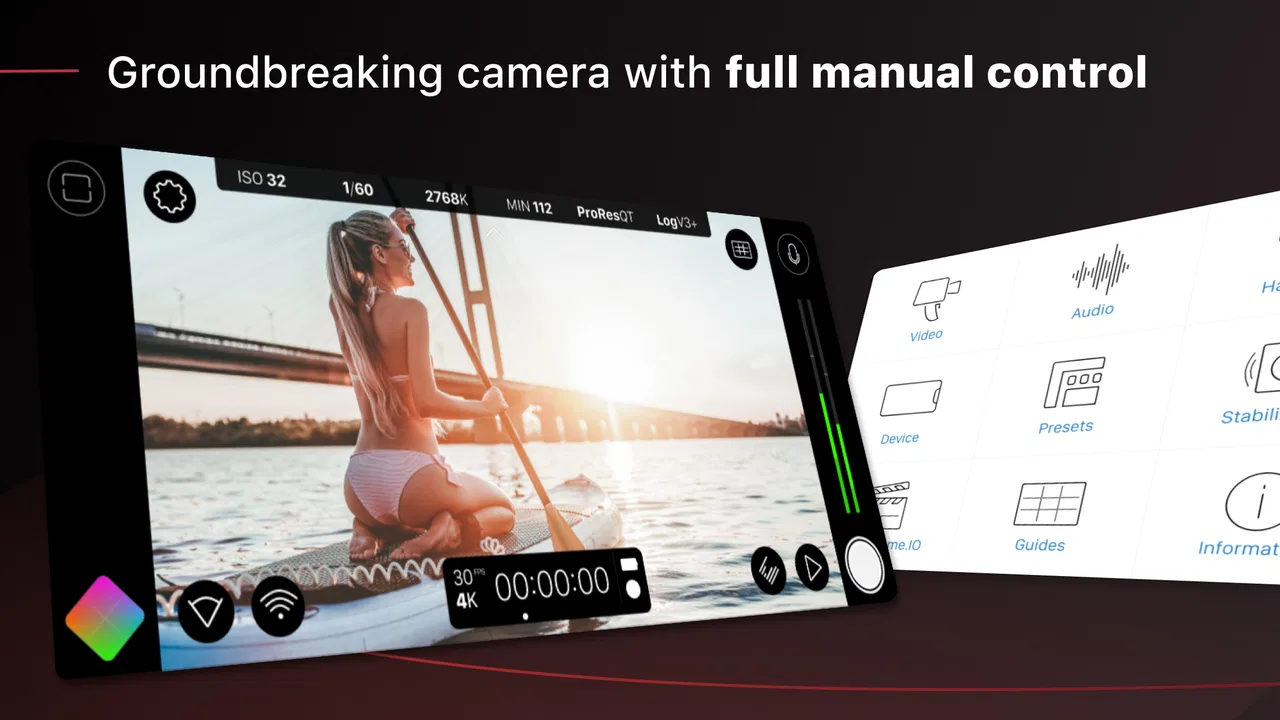
Filmic Pro is a professional-style video camera app designed for creators who want more manual control than a standard phone camera provides. It offers tools such as adjustable focus, exposure, shutter speed, ISO, white balance, frame rate, resolution, and audio settings. After testing its controls, it feels best suited to filmmakers, journalists, musicians, vloggers, and anyone creating polished video directly from a compatible smartphone.
02Is Filmic Pro free to download, or does it require a subscription?
The app’s availability, trial options, and pricing can vary by platform, region, and current developer offers. Filmic Pro generally uses a paid model or subscription-based access for its professional recording tools, so users should check the latest listing in Google Play or the App Store before downloading. Some features may also depend on the selected plan, supported device, or optional in-app purchases.
03Which phones and tablets are compatible with Filmic Pro?
Compatibility depends on the operating system, device model, camera hardware, and features supported by the manufacturer. Newer iPhones and higher-end Android phones usually provide the broadest selection of recording controls, codecs, frame rates, and resolutions, while older or less powerful devices may have limitations. Always review the official store requirements before installing, especially if you need 4K, high frame rates, advanced audio, or external-camera support.
04Does Filmic Pro support manual video and audio controls?
Yes, manual control is one of Filmic Pro’s main advantages over a typical default camera app. Depending on the device, you can adjust focus, exposure, shutter speed, ISO, white balance, frame rate, resolution, and other recording parameters. The app also includes audio-related controls and monitoring options on supported hardware. However, the exact tools available can differ between Android and iOS devices because of hardware and system restrictions.
05Is Filmic Pro suitable for beginners, or is it only for professionals?
Beginners can use Filmic Pro, but the large number of controls may feel overwhelming at first. Automatic modes make it possible to start recording quickly, while manual settings become useful as you learn about exposure, focus, frame rates, and white balance. In testing, the interface feels much more rewarding when users take time to practice. It is a strong choice for improving video quality, but casual users may prefer a simpler camera app.
Pros
- Manual focus
- exposure
- and white-balance controls offer precise shooting.
- Supports high-quality recording formats for more flexible editing workflows.
- Audio controls help monitor and adjust microphone input while filming.
- Customizable presets make it faster to switch between different shooting setups.
- Useful framing tools assist with composition and maintaining consistent shots.
Cons
- Many advanced features require a paid subscription or additional purchase.
- The professional interface can feel overwhelming for casual smartphone users.
- High-resolution recording can quickly consume storage space and battery life.
- Performance depends heavily on the phone’s camera hardware and chipset.
- Some features may vary or be unavailable across different Android and iOS devices.

Filmic Pro: Mobile Cine Camera
Gallery